

KwickAcademy Cyber Safety and Ethics · 8 min · free
Introduction to C++: Structure of a Program, cin and cout
Plays from our YouTube channel. Watch on YouTube
A C++ program adds headers with #include, starts at main(), prints with cout « and reads with cin ». C++ was built from C by Bjarne Stroustrup and named in 1983.
Follows the syllabus of: NIOS Senior Secondary Computer Science (330)
On screen in this lesson
From C to C++
| C: made by Dennis Ritchie at Bell Labs, early 1970s |
| C++: made by Bjarne Stroustrup at Bell Labs, from 1979 |
| First called "C with Classes", renamed C++ in 1983 |
| ++ is the increment operator: "one step ahead of C" |
C and C++ compared
| Point | C | C++ |
|---|---|---|
| Style | Procedural | Procedural + OOP |
| Classes, objects | No | Yes |
| Output | printf | cout |
| Input | scanf | cin |
| Overloading | No | Yes |
| File extension | .c | .cpp |
Structure line by line
| Line | Name | Job |
|---|---|---|
| #include <iostream> | Preprocessor line | Adds the I/O file |
| using namespace std | Using directive | Short names |
| int main() | main function | Program starts |
| { } | Braces | Mark a block |
| cout << ...; | Statement | Ends with ; |
| return 0; | Return | 0 means success |
Header files
| A header file holds ready-made declarations |
| iostream gives cin, cout and endl |
| Modern C++ writes <iostream>, not <iostream.h> |
| Missing header: error, 'cout' was not declared |
What is a namespace?
| A namespace is a named group of names |
| Standard library names live in namespace std |
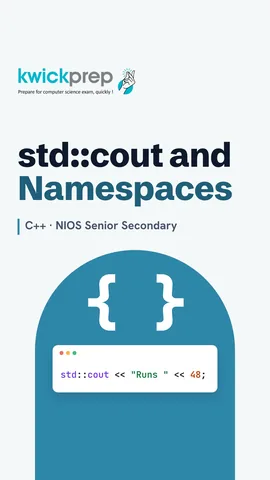
| std::cout means: cout from the std group |
| using namespace std; lets you drop std:: |
cin and cout at a glance
| Object | Operator | Direction |
|---|---|---|
| cout | << insertion | Program to screen |
| cin | >> extraction | Keyboard to program |
| endl | used with << | New line |
Quick answers
What does using namespace std; do?
It lets you write cout instead of std::cout.
Which operator does cin use?
», the extraction operator.
KwickClips from this lesson
Short clips, one idea each. Good for revision the night before.
The full lesson, in text
Hello students, welcome to Kwickprep. Why does a C plus plus program start with a strange line called hash include? Today we will answer that. We will see how C plus plus grew from C, and the parts of a program. Then we learn input and output, and how to compile and run.
Let us begin with a little history. The C language was created by Dennis Ritchie at Bell Labs in the early nineteen seventies. Later, Bjarne Stroustrup, also at Bell Labs, started building a new language in nineteen seventy nine. He first called it C with Classes, and in nineteen eighty three it was renamed C plus plus. Plus plus is the increment operator, which adds one, so the name means one step ahead of C.
Here are the main differences. C is procedural, which means a program is a list of functions, while C plus plus also supports object oriented programming. Only C plus plus has classes and objects. For output, C uses print f, and C plus plus mostly uses see out. For input, C uses scan f, and C plus plus uses see in. C plus plus allows function overloading, where two functions share one name, but C does not. And C files end in dot c, while C plus plus files usually end in dot cpp.
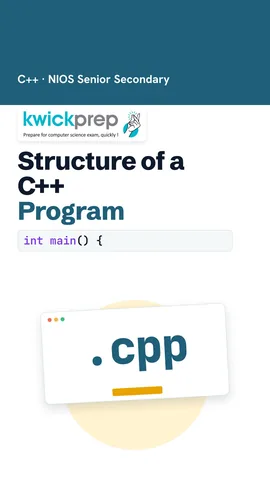
Here is a complete program. Read the screen first, and then we will study each line. It prints Hello students. Almost every C plus plus program you write in class will have this same shape.
Now each line of the program. Hash include is a preprocessor directive, which is an instruction handled before compiling, and it adds the header file called iostream. Using namespace S T D lets us write short names like see out. Every program starts running from the function called main. The curly braces mark the start and end of a block of code. Each statement ends with a semicolon. Return zero tells the operating system that the program finished successfully.
Let us look closely at the header file. A header file holds ready made declarations that we can reuse. The header iostream gives us see in, see out and end L. Old books and Turbo C plus plus write iostream dot H, but modern compilers use the name without dot H. If you forget the include line, the compiler stops with an error saying see out was not declared in this scope.
Next, a new word, namespace. A namespace is a named group that keeps names from clashing, like two students named Riya in different sections. All names of the standard library live in a namespace called S T D. Writing S T D, double colon, see out means see out from the S T D group. The line using namespace S T D lets you drop that prefix and write only see out.
This program has no using line, so every name carries the S T D prefix. The double colon is called the scope resolution operator. The arrows are the insertion operator, and they can be chained to print text and a number together. End L ends the line. The output is Runs, colon, forty eight.
Here is a canteen bill. Each see out line chains a word and a price. Because of end L, the second item starts on a new line. Pause and predict. What prints if we remove both end L parts? Everything prints on one line, as Samosa fifteen Tea ten, with no break.
Now input. The line int marks creates a whole number box called marks. See in, followed by the extraction operator, waits for the user to type a value and stores it in marks. If the user types seventy two and presses Enter, the program prints Marks, colon, seventy two. In main, return zero can be left out, because C plus plus adds it for you.
Here is a trick to remember the arrows. See out uses the insertion operator, and data flows from the program to the screen. See in uses the extraction operator, and data flows from the keyboard into the variable. End L is used with the insertion operator to move to a new line. The arrows always point the way the data travels.
How does your code become a running program? First, you type the source code and save it in a file ending in dot cpp. Next, the compiler translates it into machine code, which the computer understands. The compiler then reports any errors. If there are errors, you fix the code and compile again. If there are no errors, you run the program and see the output.
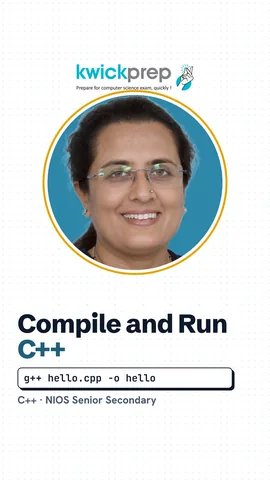
With the free GCC compiler, type G plus plus and the file name. Then add dash O and a name for the program. This creates a program file called hello. On Linux or Mac, you run it by typing dot slash hello. On Windows, it is called hello dot exe. Editors such as Code Blocks or Dev C plus plus do both steps with one Build and Run button.
Board exams often ask you to find errors, so learn these four. Forget a semicolon, and the compiler says expected semicolon. Forget the include line, and it says see out was not declared. C plus plus is case sensitive, so writing main with a capital M gives a linker error, undefined reference to main. Use the wrong arrow with see in, and the compiler says no match for the operator.
Let us revise what we learned today. C plus plus grew out of C, created by Bjarne Stroustrup and named in nineteen eighty three. Hash include adds header files like iostream. Every program starts running from main. See out with the insertion operator prints, see in with the extraction operator reads, and both live in the S T D namespace. Finally, you write, compile, fix errors, and then run. Type the canteen bill program yourself and change the prices.
Courses that teach this
| Course | Unit |
|---|---|
| NIOS Senior Secondary Computer Science (330) | Module 3: Programming in C++ |
| Programming All levels C++ | C++ Foundations |
Free to watch, no sign-up. The live classes are the paid course; these lessons stay free either way.
Disclaimer. KwickAcademy is free study material for general learning and revision. Parts of it, including the voice-over, are produced with the help of AI tools and may contain errors; if you spot one, please tell us and we will correct it. Syllabus, marks and exam details follow the latest official board publications available to us, and boards can change them at any time, so always confirm against your board's official website and your school. Using this material does not guarantee any marks or result. Board names and trademarks belong to their owners; Kwickprep is not affiliated with or endorsed by any examination board. We never ask for passwords, OTPs or ID numbers. Your progress is saved only in this browser. Full disclaimer · Privacy